
This guide explains everything you need to know about brushless cordless drills. You’ll learn how the brushless motor technology works, why it’s superior to brushed motors, and how to choose the right model for your needs. We also provide a step-by-step guide on using and maintaining your drill for peak performance and longevity.
Key Takeaways
- Brushless motors are more efficient and durable: They have no physical brushes that wear out, leading to longer tool life, more power, and longer battery runtime.
- They excel in demanding applications: The smart electronics deliver optimal power for tasks like driving large screws, drilling into hard materials, and prolonged use.
- The initial cost is higher but offers long-term value: You pay more upfront but save on maintenance, replacement brushes, and potentially fewer battery purchases.
- Choosing the right voltage and battery is crucial: Match the drill’s power (12V, 18V/20V Max) to your project scale, and prioritize modern lithium-ion batteries.
- Proper maintenance is simple but essential: Keeping the tool clean, storing batteries correctly, and using the right accessories will maximize your investment.
- They are not always necessary for casual users: For very light, occasional tasks, a quality brushed drill might be a more budget-friendly choice.
Your Complete Cordless Drill Brushless Guide Explained
Welcome to your ultimate guide on brushless cordless drills. If you’re shopping for a new drill or just curious about the technology, you’ve come to the right place. This guide will cut through the jargon and explain exactly what a brushless motor is, why it matters, and how it can transform your DIY projects or professional work. We’ll walk you through how to choose the perfect brushless drill, how to use it like a pro, and how to keep it running smoothly for years. Let’s dive in and unlock the power of brushless technology!
Step 1: Understanding Brushless Motor Technology
First, let’s break down the “brushless” part. To appreciate it, you need to know what it’s replacing: the brushed motor.
Visual guide about Your Complete Cordless Drill Brushless Guide Explained
Image source: toolsadvisers.com
The Old Way: Brushed Motors
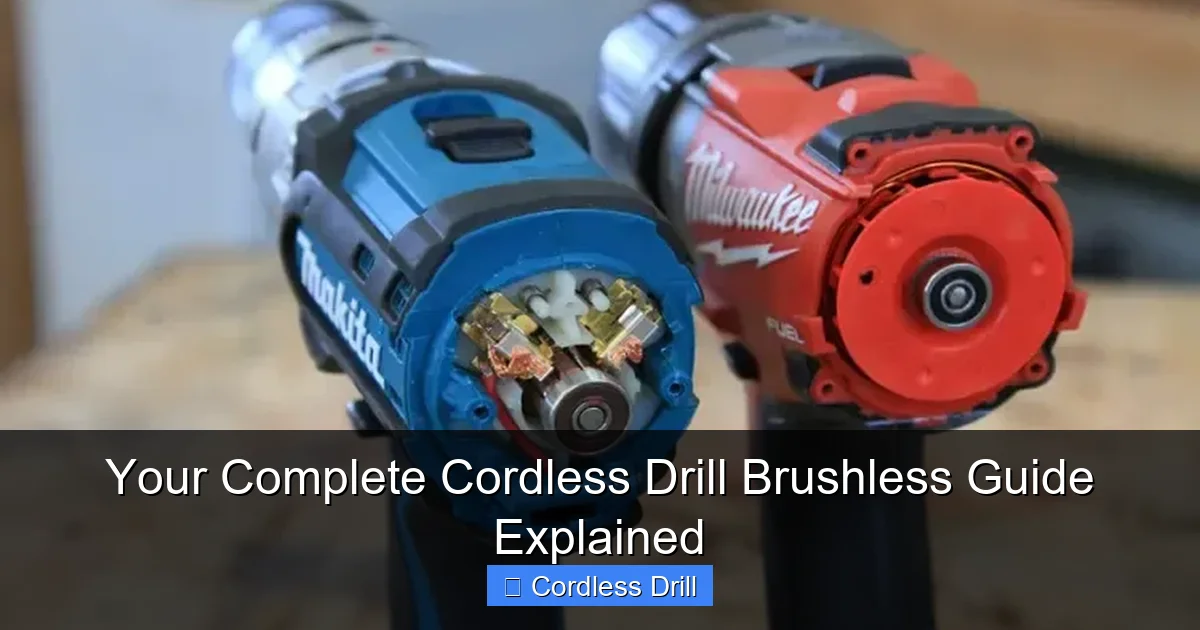
Traditional cordless drills use brushed motors. Inside, small carbon brushes press against a spinning part called the commutator. This physical contact creates the electromagnetic field that makes the motor turn. The problem? This contact creates friction, sparks, and heat. Over time, the brushes wear down and need replacement. This friction also wastes energy, reducing power and battery life.
The New Way: Brushless Motors
A brushless motor, as the name suggests, has no brushes. Instead, it uses a small computer circuit board inside the drill. This smart controller precisely delivers power to the motor’s coils. It knows the exact position of the motor’s rotor and energizes the coils in a sequence to create rotation—all without any physical contact.
Think of it like a brushed motor needing a mechanical push, while a brushless motor gets a perfectly timed electronic signal. This difference is a game-changer.
Step 2: Why Choose a Brushless Cordless Drill? The Key Benefits
Now that you know how it works, let’s talk about the real-world advantages you’ll enjoy.
Visual guide about Your Complete Cordless Drill Brushless Guide Explained
Image source: toolsadvisers.com
Longer Runtime and More Power
Because there’s no energy lost to friction and heat from brushes, brushless motors are far more efficient. This means more of your battery’s energy goes directly into the drill bit or driver. You get more work done per charge. For demanding tasks, this efficiency translates to sustained power where a brushed motor might bog down.
Greater Durability and Less Maintenance
No brushes to wear out means the motor itself lasts much, much longer. There are fewer moving parts that degrade. You won’t be opening the drill to replace brushes. The reduced heat also means internal components aren’t stressed as much, leading to a longer overall tool life. When researching the best cordless drill, you’ll find nearly all top-tier models feature brushless technology for this reason.
Compact and Lighter Design
Brushless motors can be made smaller and lighter for the same power output. This makes the drill less tiring to use overhead or for extended periods. The weight savings is a huge bonus for all-day professionals and DIYers alike.
Smart Performance Features
The onboard computer allows for advanced features. Many brushless drills can sense the resistance and automatically adjust power and speed to prevent stripping screws or over-drilling. This smart control protects both your workpiece and your tool.
Step 3: How to Choose the Right Brushless Drill for You
Not all brushless drills are created equal. Follow these steps to find your perfect match.
Visual guide about Your Complete Cordless Drill Brushless Guide Explained
Image source: toolsadvisers.com
Assess Your Project Needs (Voltage)
- 12V Brushless Drills: Perfect for light-duty tasks. Think assembling furniture, drilling small pilot holes in wood or drywall, and driving screws. They are compact, lightweight, and ideal for working in tight spaces or overhead.
- 18V/20V Max Brushless Drills: This is the sweet spot for most users. The “20V Max” label is a marketing term; these tools run on the same 18V nominal battery platform as professional tools. They handle 95% of DIY and contractor jobs—drilling into studs, masonry (with hammer function), and driving large lag bolts. This is the most versatile category.
- 36V/40V Max+ Brushless Drills: These are heavy-hitters for demanding professional use, like continuous drilling in concrete or heavy framing. They are larger, heavier, and more expensive.
Battery and Ecosystem
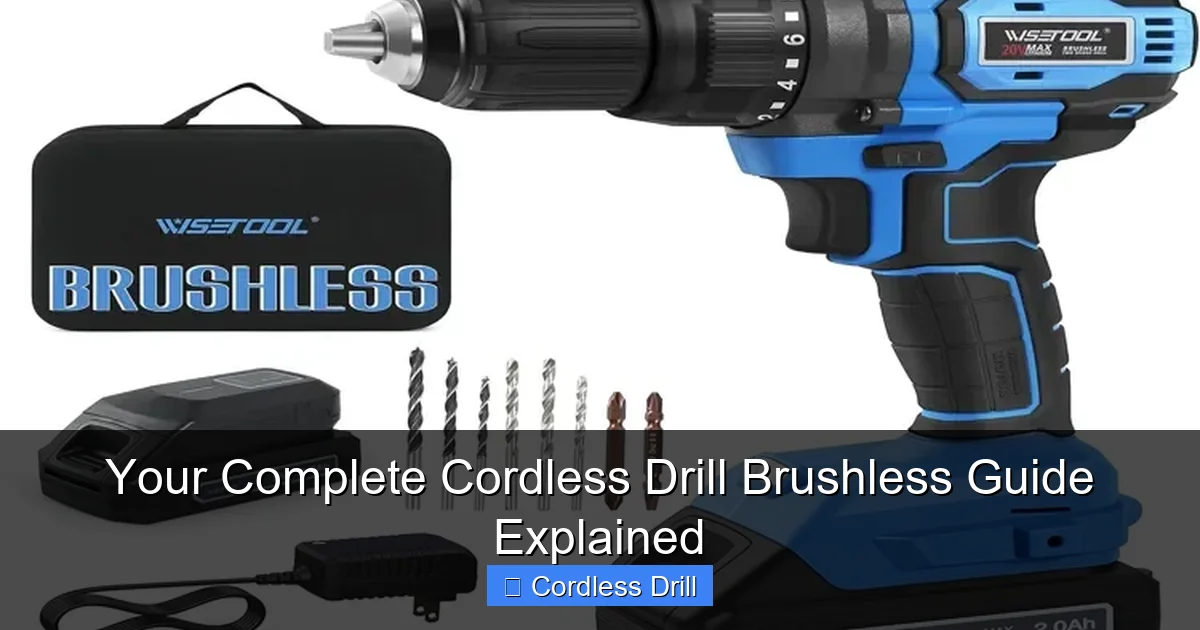
The drill is just one part of the system. Choose a brand with a wide range of tools that share the same battery. This saves money and space. Ensure you’re getting modern Lithium-Ion (Li-ion) batteries. Look for Amp-hour (Ah) ratings like 2.0Ah, 4.0Ah, or 5.0Ah. Higher Ah means longer runtime, but also more weight. A smaller battery is great for light work, while a larger one is needed for all-day drilling.
Features and Ergonomics
Go to a store and hold the drill. Check the balance. Look for a comfortable grip, a bright LED work light, and an easy-to-read battery gauge. A keyless chuck is a must for quick bit changes. Consider if you need a hammer drill function for masonry work. If you’re tackling walls, our guide on how to use a drill for screws into a wall pairs perfectly with your new tool.
Brushless vs. Impact Driver
Don’t confuse a drill with an impact driver. A drill is for drilling holes and driving smaller screws. An impact driver uses concussive force to drive long, large screws and bolts with incredible torque and less wrist strain. For a full toolkit, many people own both. Understand the difference between impact driver and hammer drill to make the right choice.
Step 4: How to Use Your Brushless Cordless Drill Effectively
You’ve got your drill. Now let’s use it safely and effectively.
Initial Setup and Safety
Charge the battery fully before first use. Wear safety glasses. Always be aware of what is behind your drilling surface (wires, pipes). Insert the battery until it clicks. To insert a bit, open the chuck by rotating it, place the bit in, and tighten firmly by hand.
Mastering the Controls
- Forward/Reverse Switch: Controls rotation direction. Forward for drilling/driving in, reverse for removing screws or backing out a bit.
- Trigger: Variable speed. Press lightly for slow speed, harder for full speed.
- Gear Selector (1/2): Gear 1 is low speed, high torque for driving screws. Gear 2 is high speed for drilling holes.
- Clutch/Torque Settings: The numbered ring. This controls how much torque is applied before the clutch disengages (makes a clicking sound). Use a low setting (4-8) for delicate tasks to avoid stripping screws. Use the drill bit icon for maximum torque when drilling holes.
Driving Screws Like a Pro
Select the correct driver bit (e.g., Phillips #2). Set the drill to forward, Gear 1, and a medium clutch setting (start around 10). Apply firm, steady pressure straight into the screw. Let the drill do the work. If the clutch clicks repeatedly, increase the setting. For final tightening on delicate material, use a very low setting.
Drilling Clean Holes
Select a sharp drill bit for your material (wood, metal, masonry). Set the drill to the drill bit icon (max torque) and Gear 2. Start slowly to create a pilot dent, then increase speed while maintaining steady pressure. For deep holes, pull the bit out occasionally to clear debris.
Step 5: Essential Maintenance for Longevity
Brushless drills are low-maintenance, but not no-maintenance.
- Keep it Clean: Blow out dust and debris from the vents and chuck with compressed air after use.
- Battery Care: Don’t leave batteries on the charger indefinitely. Store them in a cool, dry place. For long-term storage, charge them to about 60%.
- Chuck Care: Occasionally wipe the chuck jaws clean. If it becomes hard to tighten, a tiny drop of light machine oil on the threads can help.
- Storage: Store the drill and batteries in a dry case or bag to protect from moisture and dust.
Troubleshooting Common Issues
Even the best tools can have hiccups. Here’s how to solve common problems.
- Drill won’t start: Check if the battery is charged and properly inserted. Ensure the forward/reverse switch isn’t in the middle lock position.
- Bit slips or won’t grip: The chuck is not tight enough. Open it fully, ensure the bit is straight, and tighten it firmly by hand. Avoid using the drill’s power to tighten it.
- Drill seems underpowered: You might be using a worn-out battery. Try a fresh one. Also, check if you’re in the correct gear (Gear 2 for drilling). Ensure you are using a sharp, appropriate bit for the material.
- Excessive heat or smell: Stop using the drill immediately. You may be overloading it. Allow it to cool down. Forcing the drill in high-torque applications can overheat even a brushless motor.
Conclusion: Is a Brushless Drill Worth It?
Absolutely, for anyone who uses a drill more than just a few times a year. The combination of longer battery life, increased power, superior durability, and lighter weight makes brushless cordless drills a smart investment. While the upfront cost is higher, the long-term value, lack of maintenance, and better performance quickly justify the price. Whether you’re a seasoned pro or a dedicated DIYer, a brushless drill is a tool that will reliably power through your projects for years to come. Ready to explore more? Check out our full cordless drill category for more insights and reviews.
